THE PROGRAMMING WORKBENCH
Browser Coder
Make the next line make sense.
A programming workbench for learning by doing: write, debug and watch an idea become a drawing. Together, Arc and Browser Coder serve 3,000+ students, instructors and managers.
 Check my work ↗
Original application. Fictional demo data.↗ Screens open at full resolution
- MY ROLE
- Co-developer · integration, debugging & architecture
- CONTEXT
- Two developers · my coworker and me
- TIMELINE
- Apr 2026 - now
- PROJECT STATUS
- Live · Continuously supported
THE IDEA, IN A MOMENT
Make the next line make sense.
The result is only the start. See the variables behind it, compare a previous pause, or follow a drawing back to its source.
Where I contributed
I build, support, and continually expand Browser Coder with one coworker. My work includes learning-platform integration, the execution refactor, debugging tools, diagnostics and reliability fixes.
Learn from feedback
A mistake is a place to start.
A missing colon becomes a clear explanation. A visible repair gets the program moving. Three checks reveal the more interesting question: is the answer actually right?
From a mistake to an explanation
A real Python error, a visible repair and three teacher-defined checks. Follow the feedback all the way to a corrected result.
Read the walkthrough
- Understanding comes before the answer.
BROWSER CODER / A REAL PYTHON LEARNING JOURNEY
- 01 / Start with the compiler
A missing colon stops this program before it runs.
- 02 / Turn the error into a next step
A plain-language explanation. A specific repair. The choice stays with the learner.
- 03 / Make the repair visible
The original editor inserts the colon. The logic still belongs to the student.
- 04 / Test the reasoning
Two cases pass. A fractional average reveals the remaining mistake.
- 05 / Keep the decimal
Replace floor division with ordinary division, then run the same checks again.
- 06 / See what changed
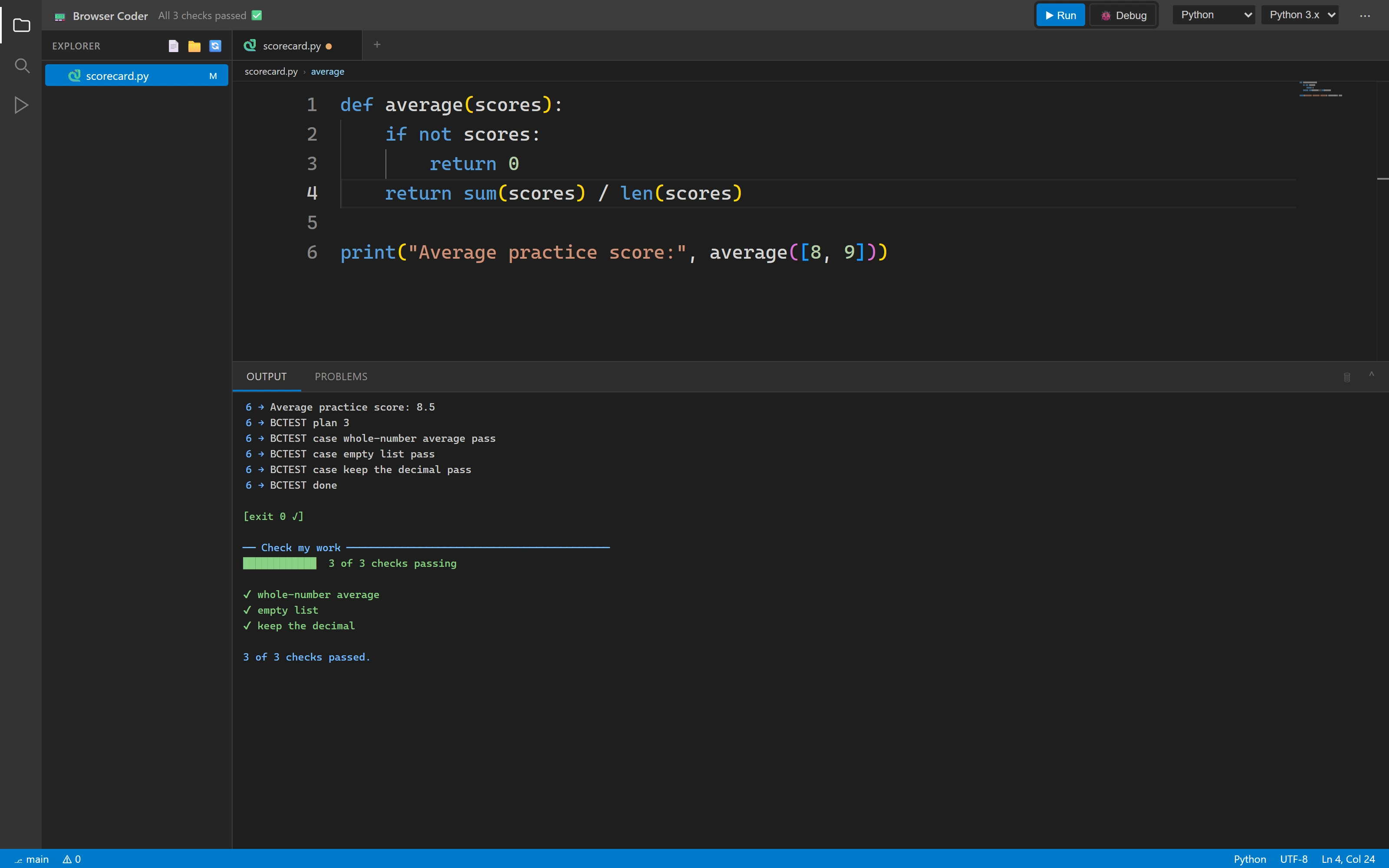
The original harness now reports 3 of 3 checks passing.
- A better result. A clearer understanding.
Real execution / Teacher-defined checks / Original app pixels
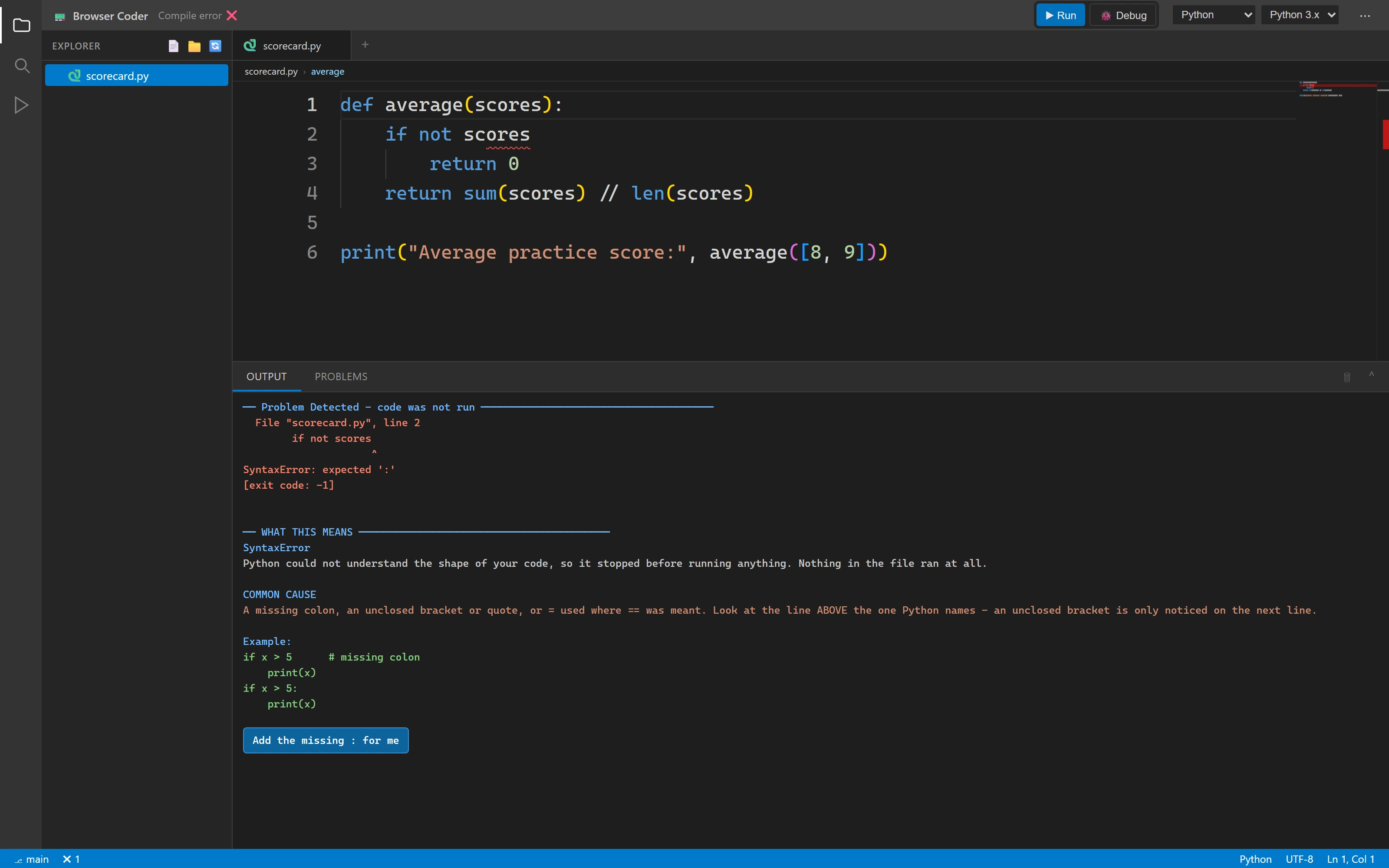
An error becomes a next step
The original diagnostic includes the compiler message, a plain-English explanation, a common cause, an example and an explicit fix.
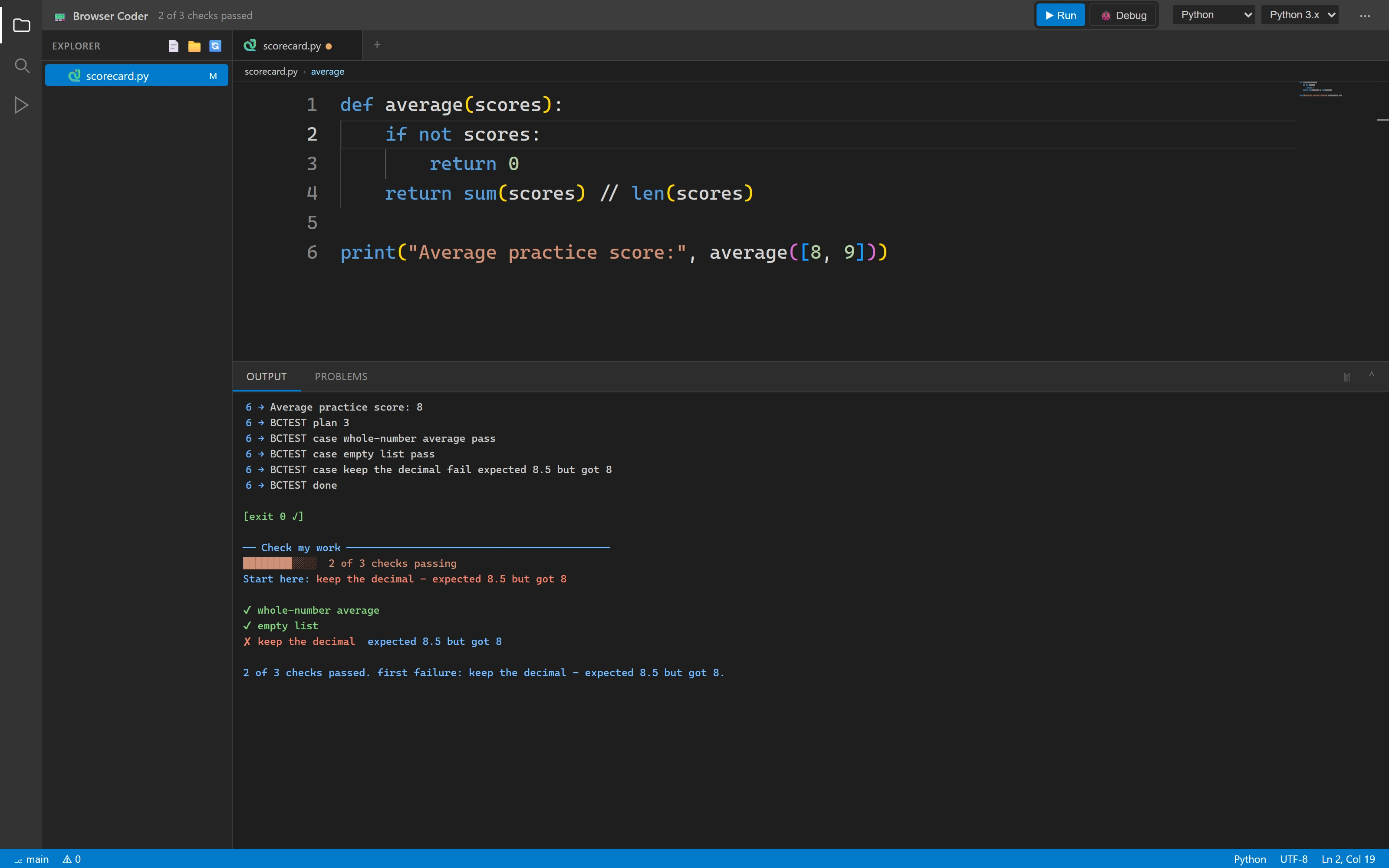
Two pass. One useful next step.
The checks distinguish a working empty-list case from the remaining decimal error, with an expected value and an actual value.
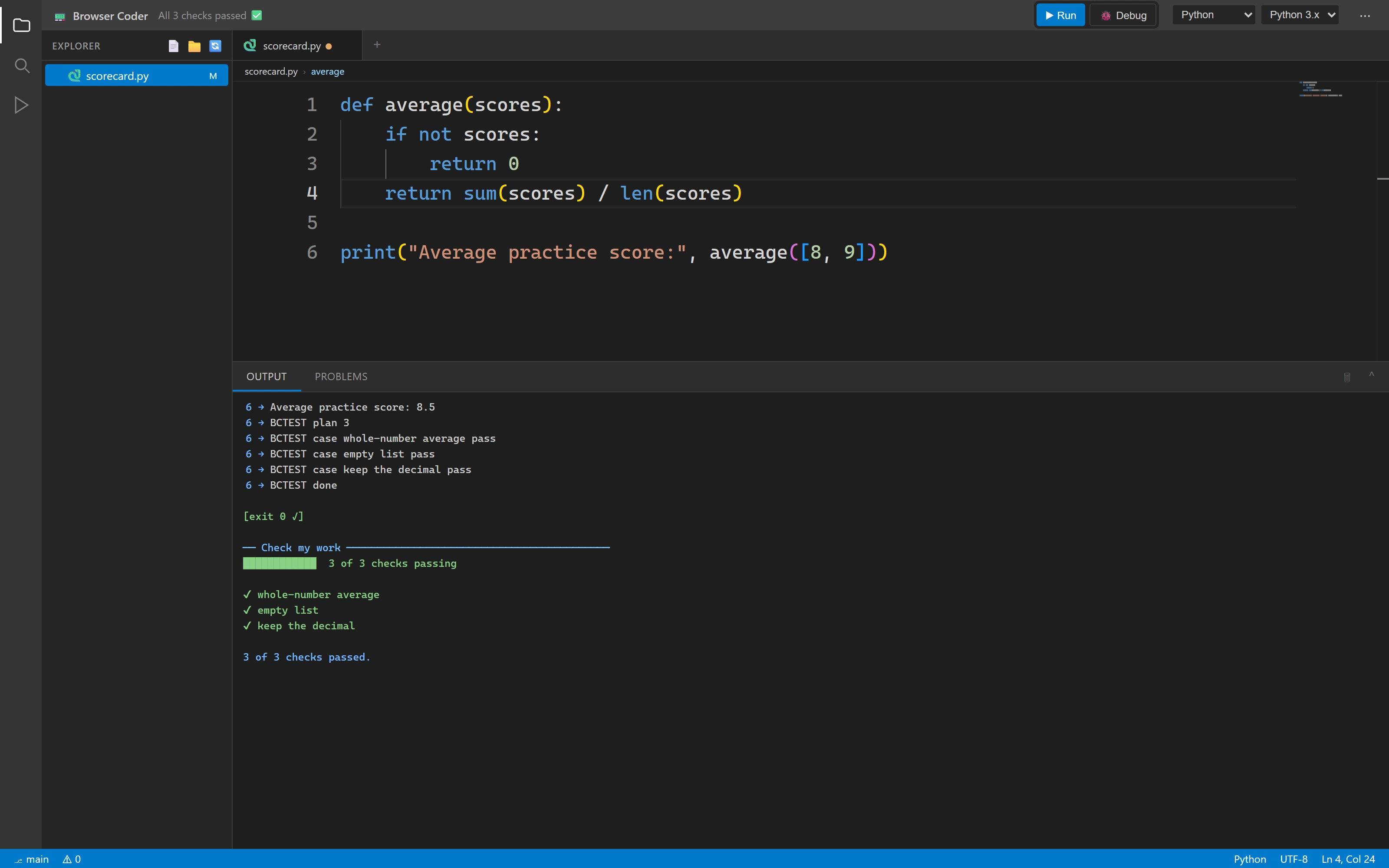
The same checks. A better result.
After the student fixes the division operator, the original marking harness reports all three checks passing.
See the state
Pause. Look closer. Connect the dots.
Run a real Python program, stop at a breakpoint and inspect the values behind the result. Move between recorded pauses to see what changed.
Watch the state change
A loop, a breakpoint and the values between iterations. Inspect an earlier pause, then return to the live program.
Read the walkthrough
- The result has a history.
BROWSER CODER / INSIDE A REAL PYTHON LOOP
- 01 / Pause before the addition
A breakpoint stops the program inside the loop.
- 02 / One line changes a value
Step over the addition. The original debugger shows total moving from 0 to 72.
- 03 / See the next iteration
The next addition changes total from 72 to 160. The difference is explicit.
- 04 / Compare pause history
Browse a recorded pause, then return to live. The Python process is not rewound.
- 05 / Finish the calculation
Continue through the remaining pauses. The real program reports an average of 84.0.
- Code. State. A reason for the result.
Original Python process / Recorded pause history / No simulated debugger
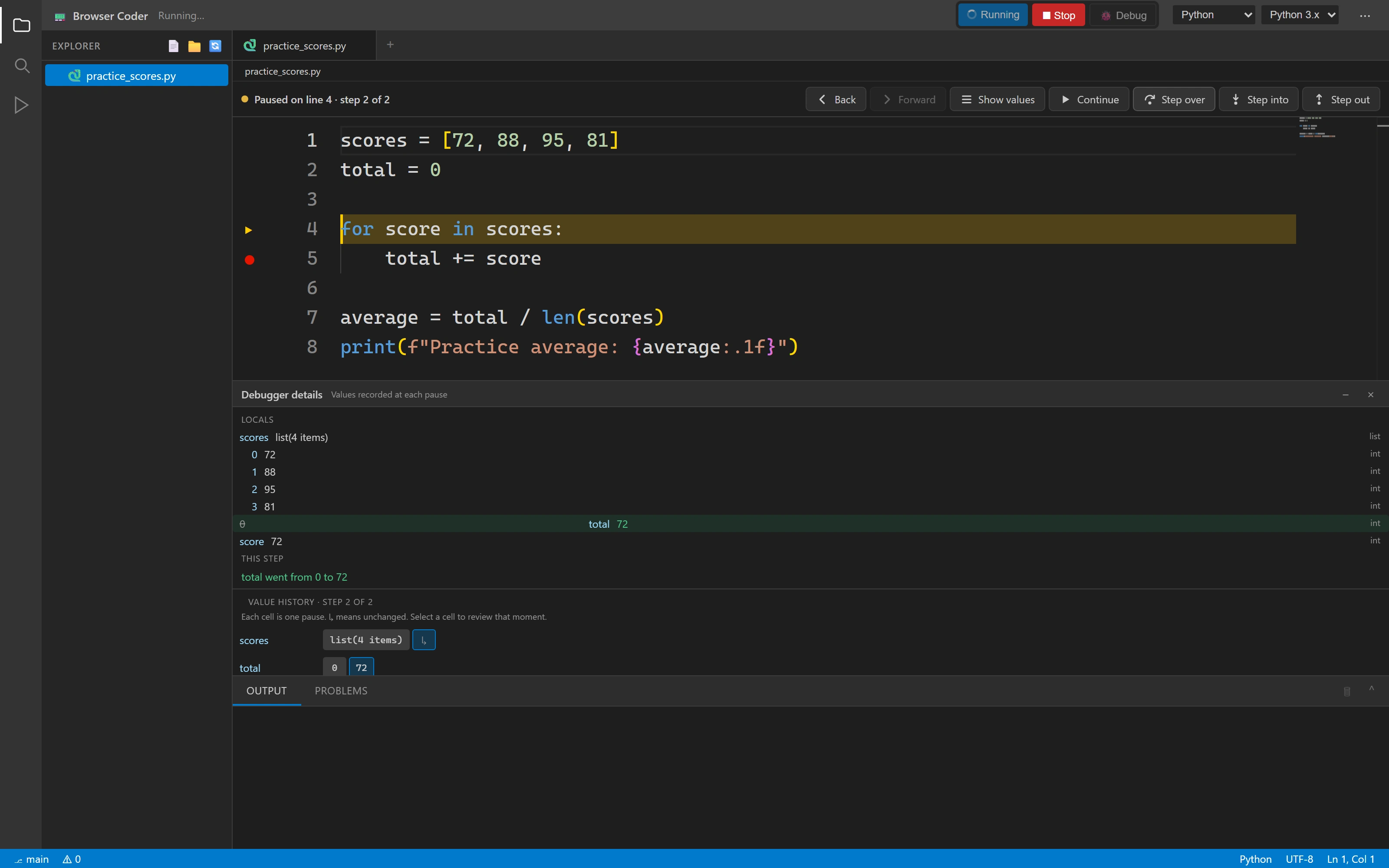
One line. One visible change.
Stepping over the addition updates total from 0 to 72 in the actual paused Python session.
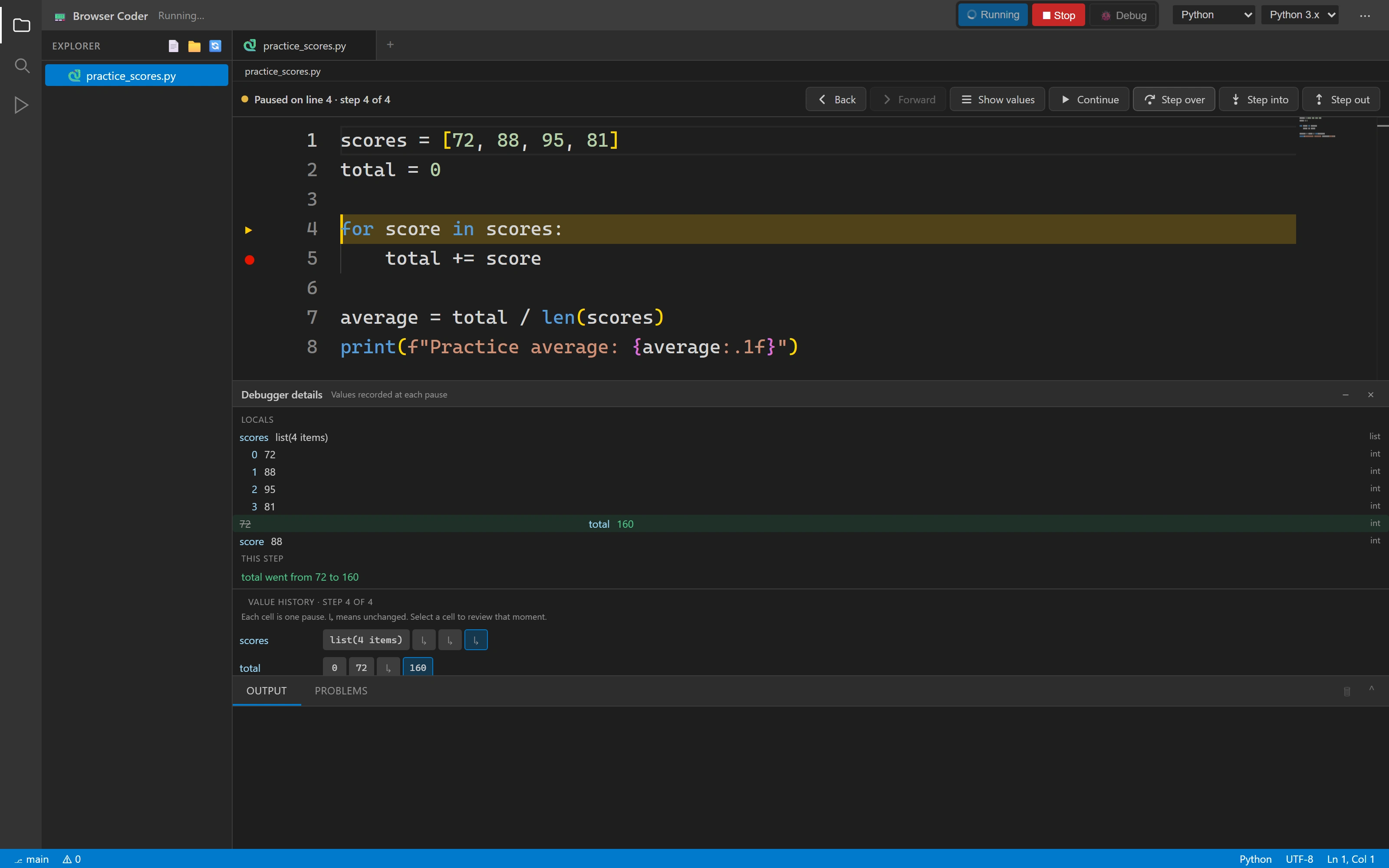
The loop carries its history forward
A later pause exposes the accumulated total after another score is added. Variable differences help connect the iteration to its state.
Think visually
One loop. A whole new perspective.
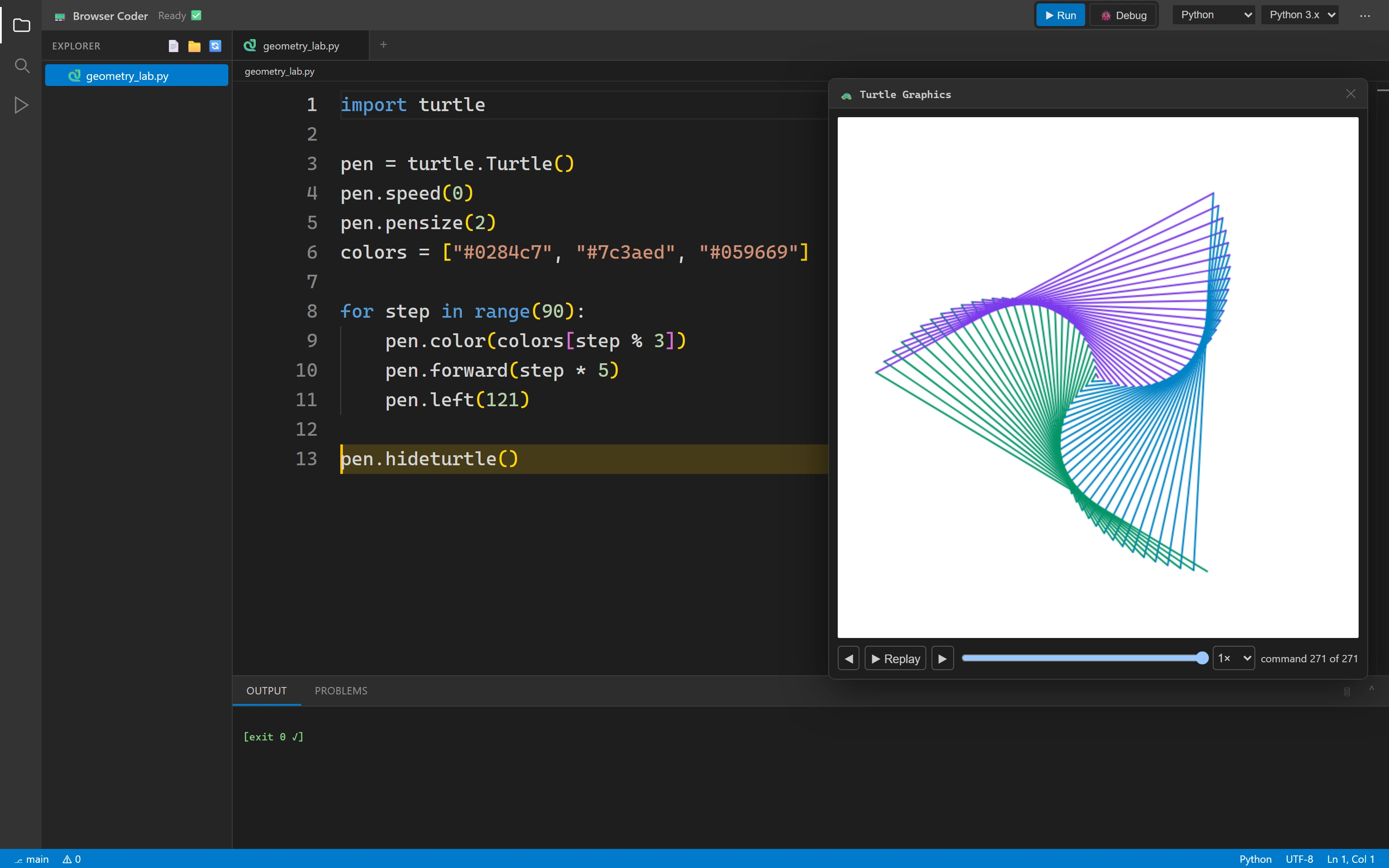
Turtle turns an ordinary loop into geometry. Replay the drawing, scrub to a particular step and connect the line of code to the mark it made.
A drawing you can think through
A short Python loop creates geometry. Replay its commands and inspect the source behind a particular step.
Read the walkthrough
- Make an idea visible.
BROWSER CODER / PYTHON TURTLE, WITH MEMORY
- 01 / Run the drawing program
Ninety loop iterations produce real Turtle commands and the finished geometry.
- 02 / Watch how it was made
Replay the recorded drawing. Source highlights follow the selected command.
- 03 / Choose a particular step
Scrub back and inspect an earlier drawing state, without running Python again.
- 04 / Return to the complete drawing
The same recorded output can be explored at the learner’s own pace.
- A mark on the canvas. A line in the code.
Real Python output / Original replay controls / Source-linked drawing commands
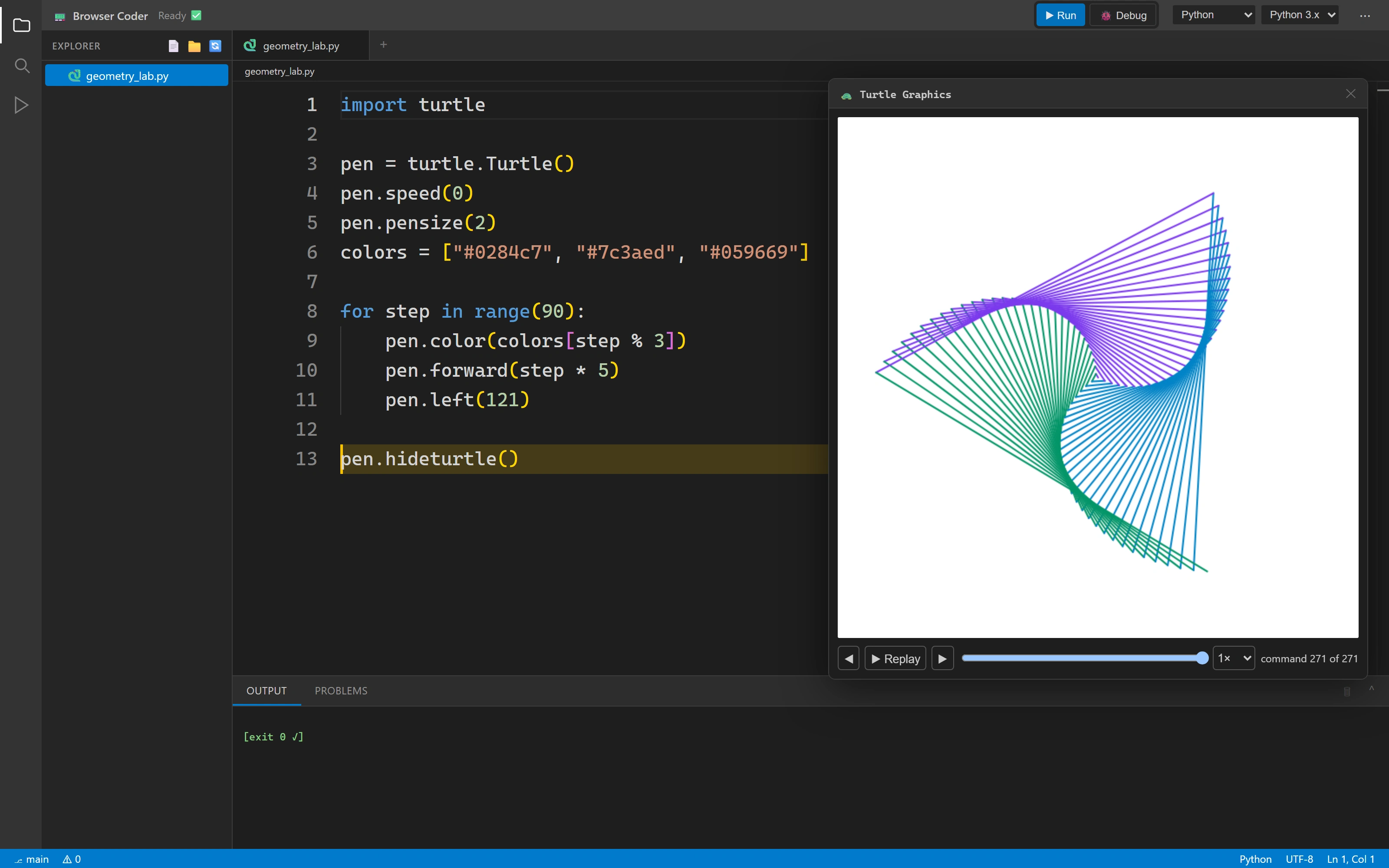
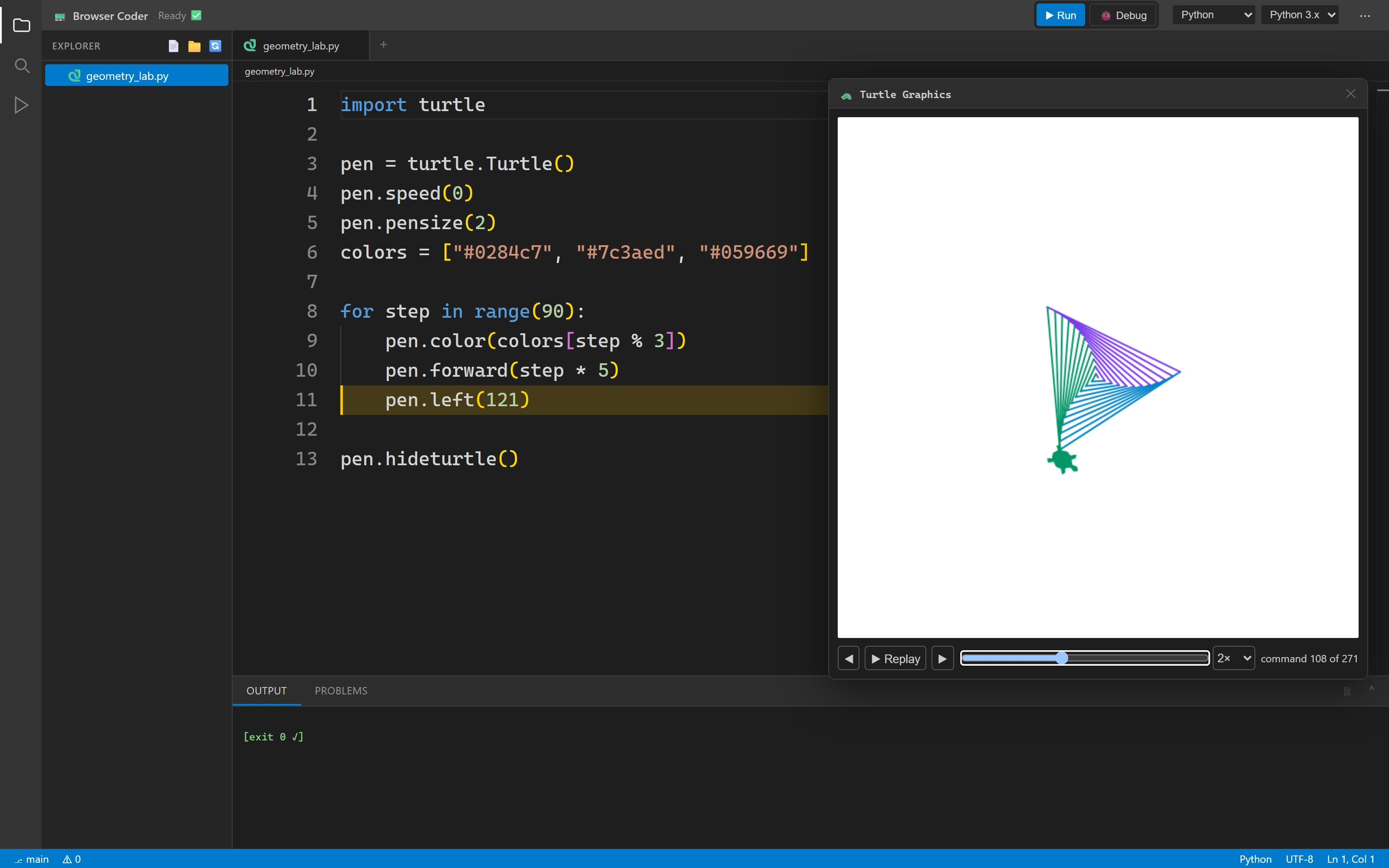
Geometry from a short Python loop
Ninety iterations generate a drawing through the original Python Turtle command path.
A particular mark, a particular line
The replay cursor selects an earlier state of the original drawing and points back to the source responsible for it.
Build & share
The whole project comes along.
HTML and CSS live together in a real workspace. Open the rendered page, then share the exact files so another person can explore an editable copy.
A small website, with its context intact
Build a multi-file student project, open the real preview and share a stable snapshot that another person can explore.
Read the walkthrough
- More than a single code snippet.
BROWSER CODER / A REAL MULTI-FILE WEB PROJECT
- 01 / Keep the files together
The fictional Orbit Club student project has separate HTML and CSS documents.
- 02 / Open the actual preview
The original preview service resolves the relative stylesheet. This is sample student work.
- 03 / Share the exact workspace
The original command publishes a project snapshot through the real backend.
- 04 / Give someone room to explore
A fresh browser opens an editable local copy. Its edits leave the published snapshot unchanged.
- A stable reference. An independent copy.
Actual preview + share services / Fictional student project / No live co-editing claim
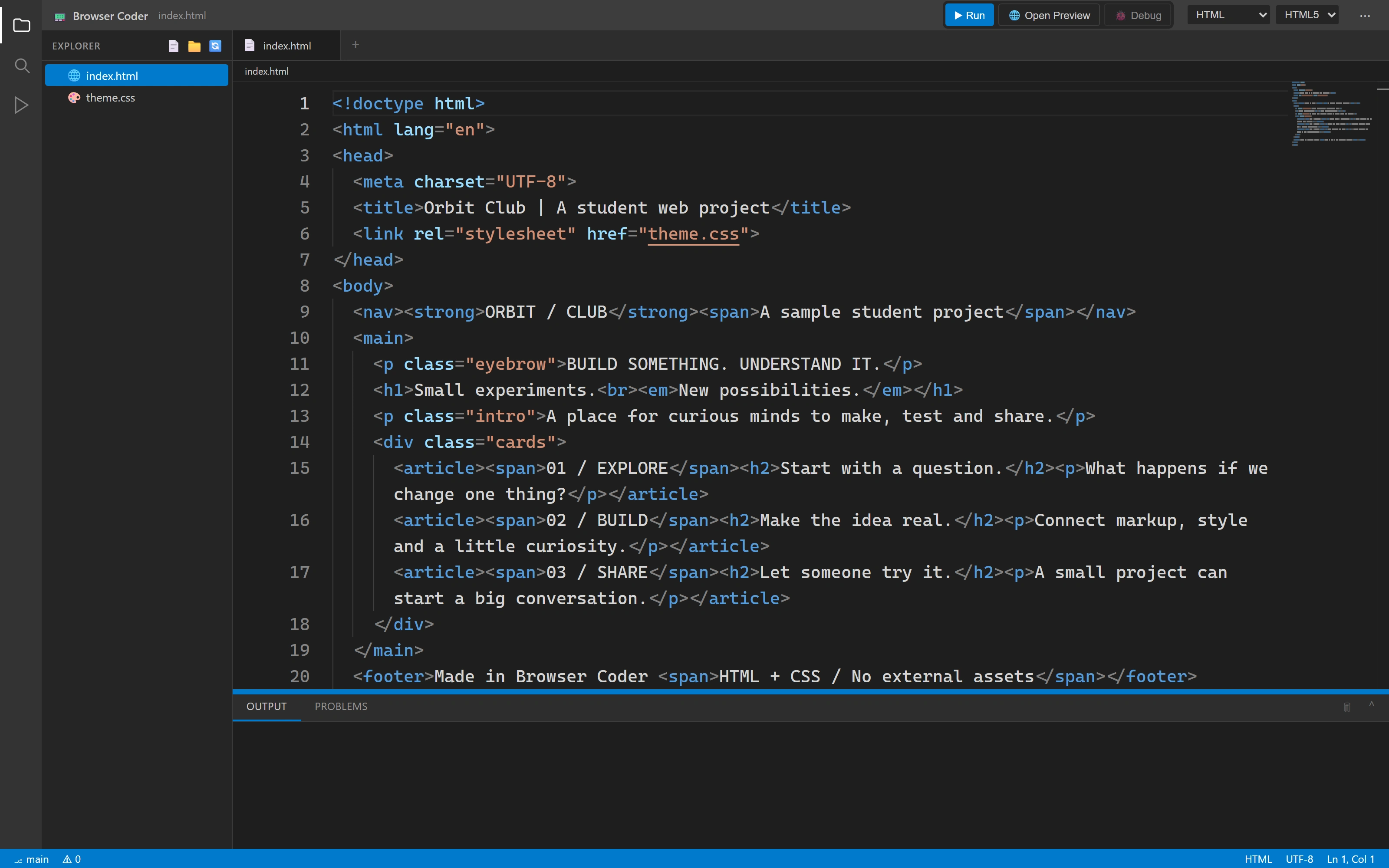
A whole project in the browser
A fictional student page uses separate HTML and CSS documents, with the real editor, file tree and preview command.
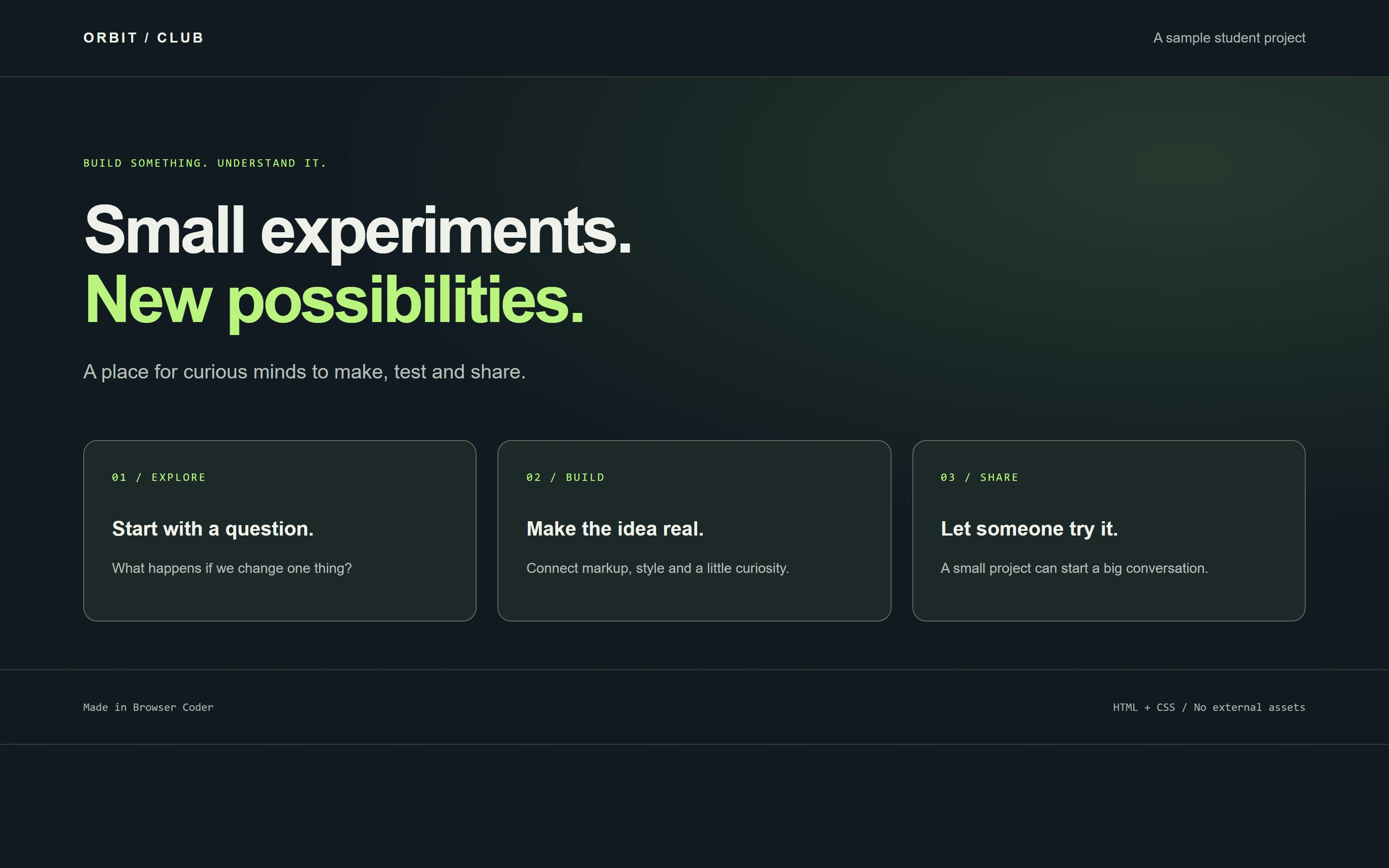
From separate files to one working page
The actual preview service resolves the page’s relative stylesheet and publishes a separate, immutable snapshot URL. This is a sample student project, not a Browser Coder product screen.
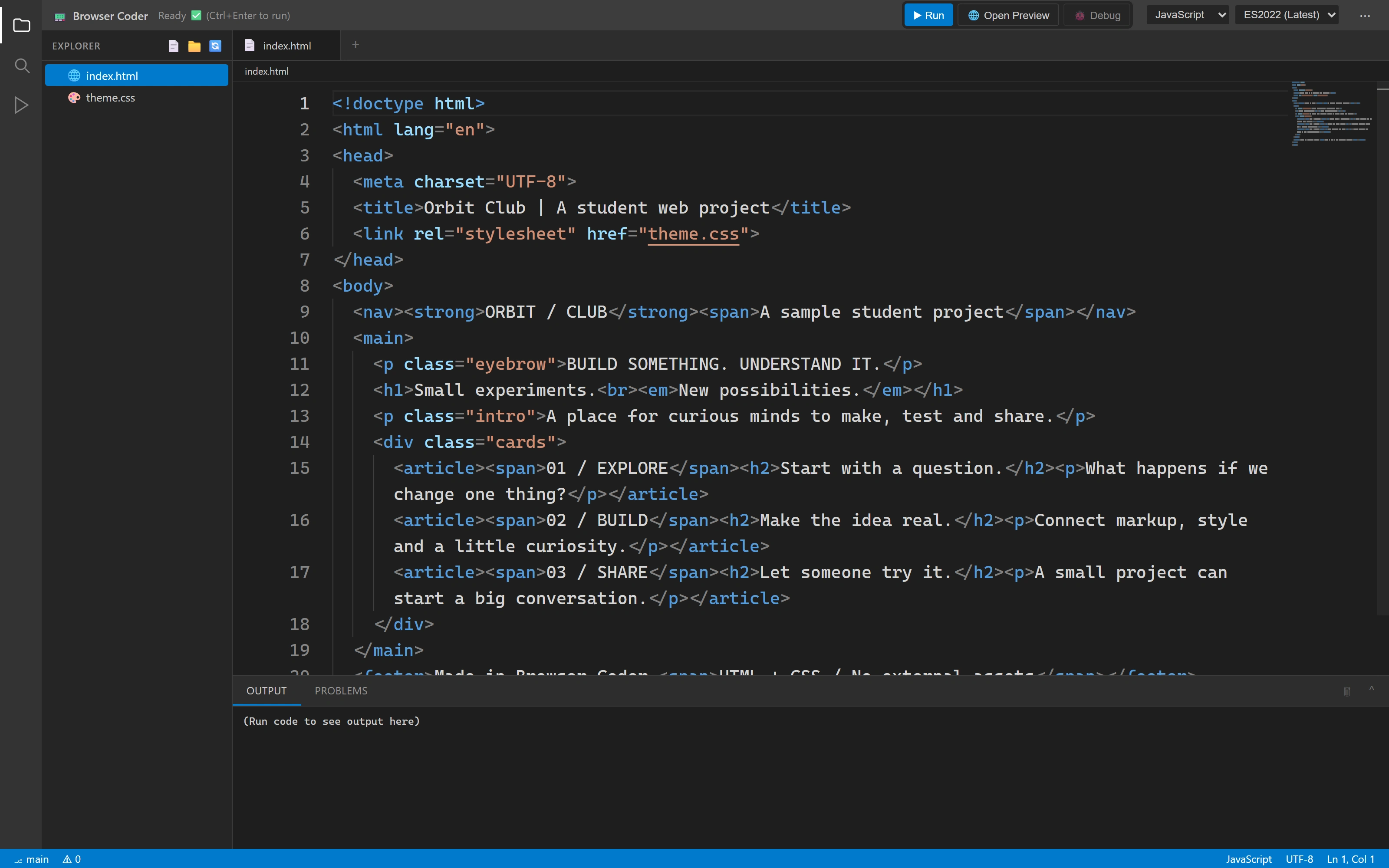
A link carries the context
A fresh browser context opens the shared HTML and CSS files. The recipient receives an editable local copy; the published snapshot stays unchanged.
More of the product 5 additional screens
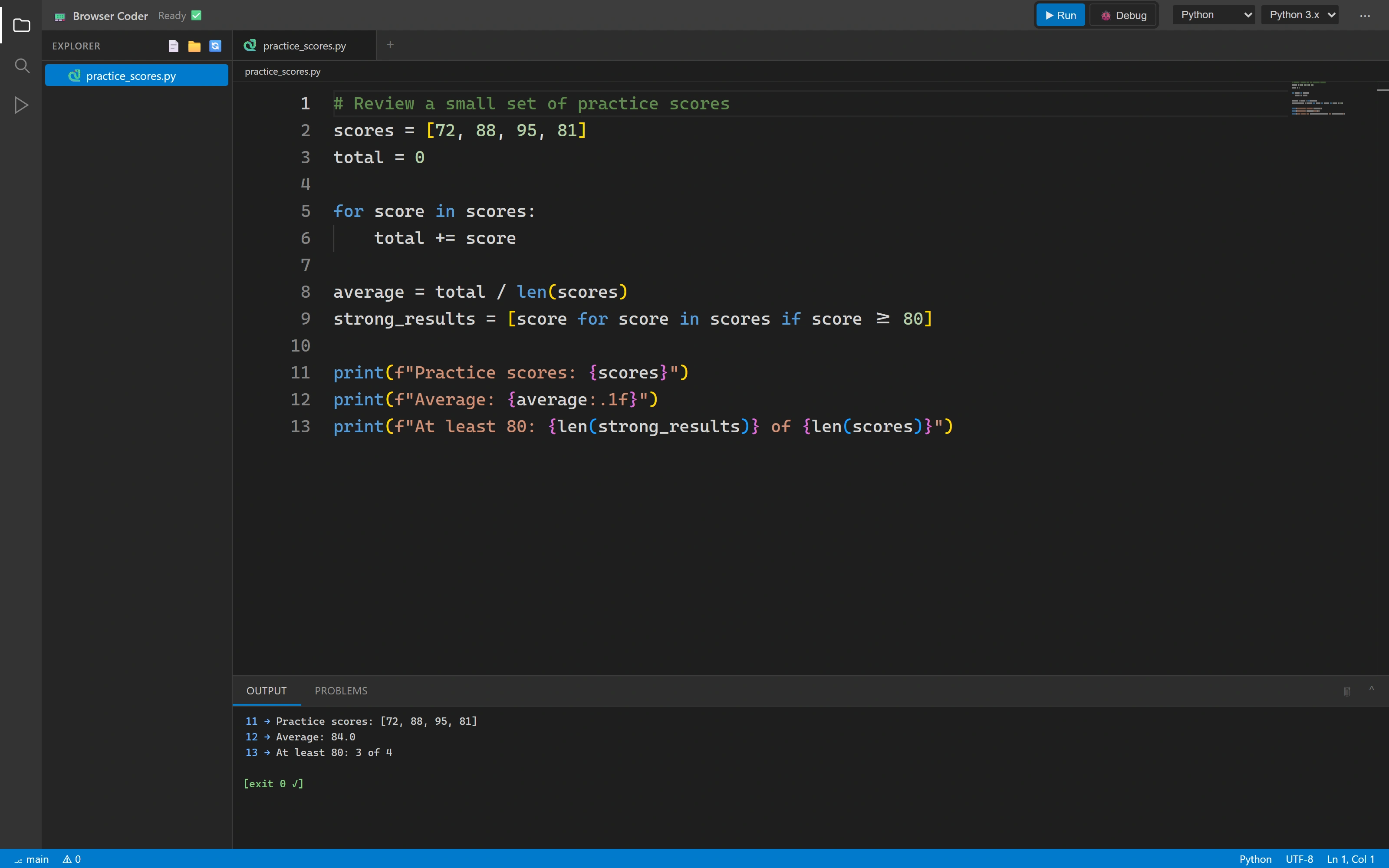
From code to a result
A Python program calculates the average, with source and successful output in the same workspace.
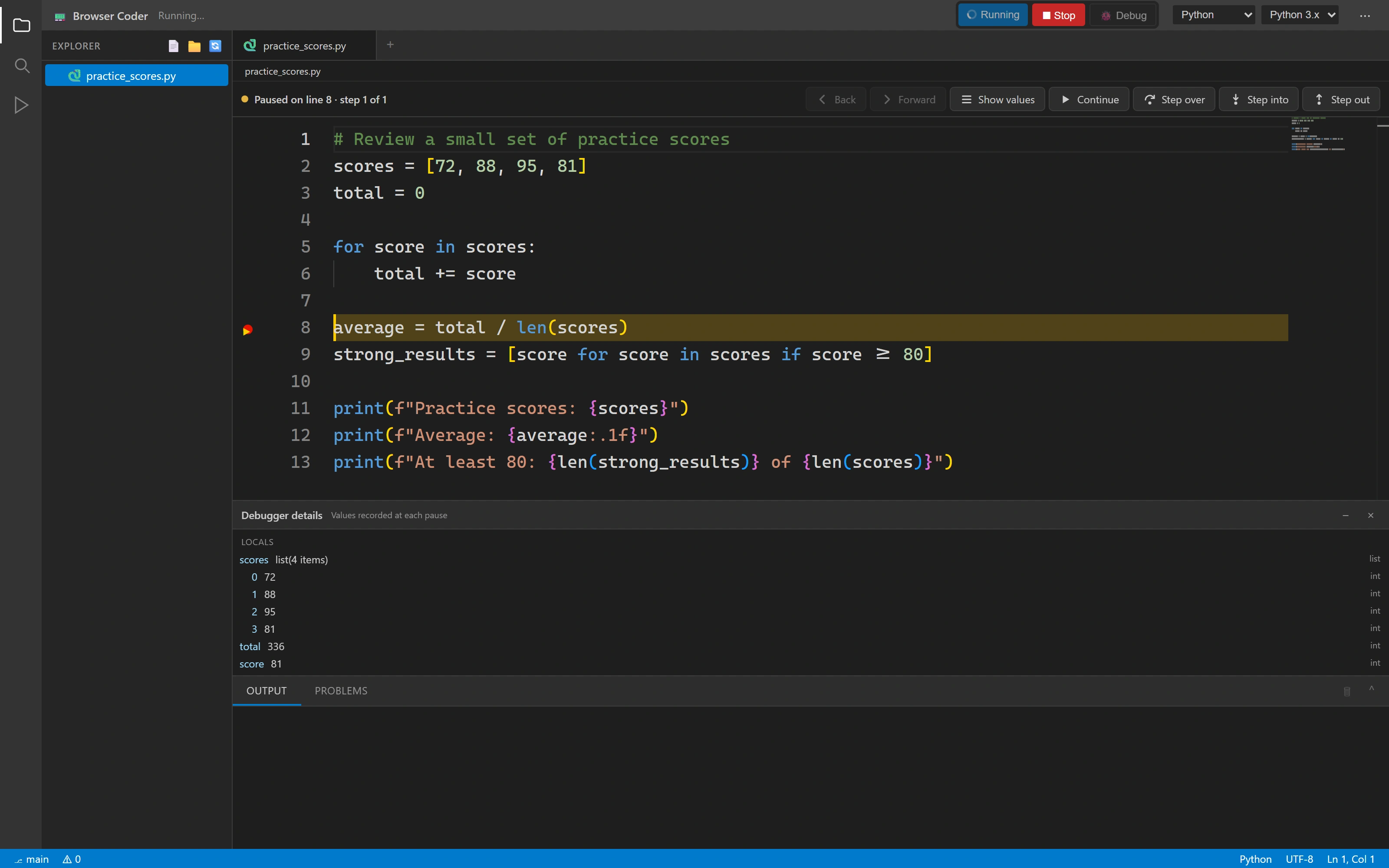
See what the program knows
A real paused Python session exposes local variables, the current line and the call stack.
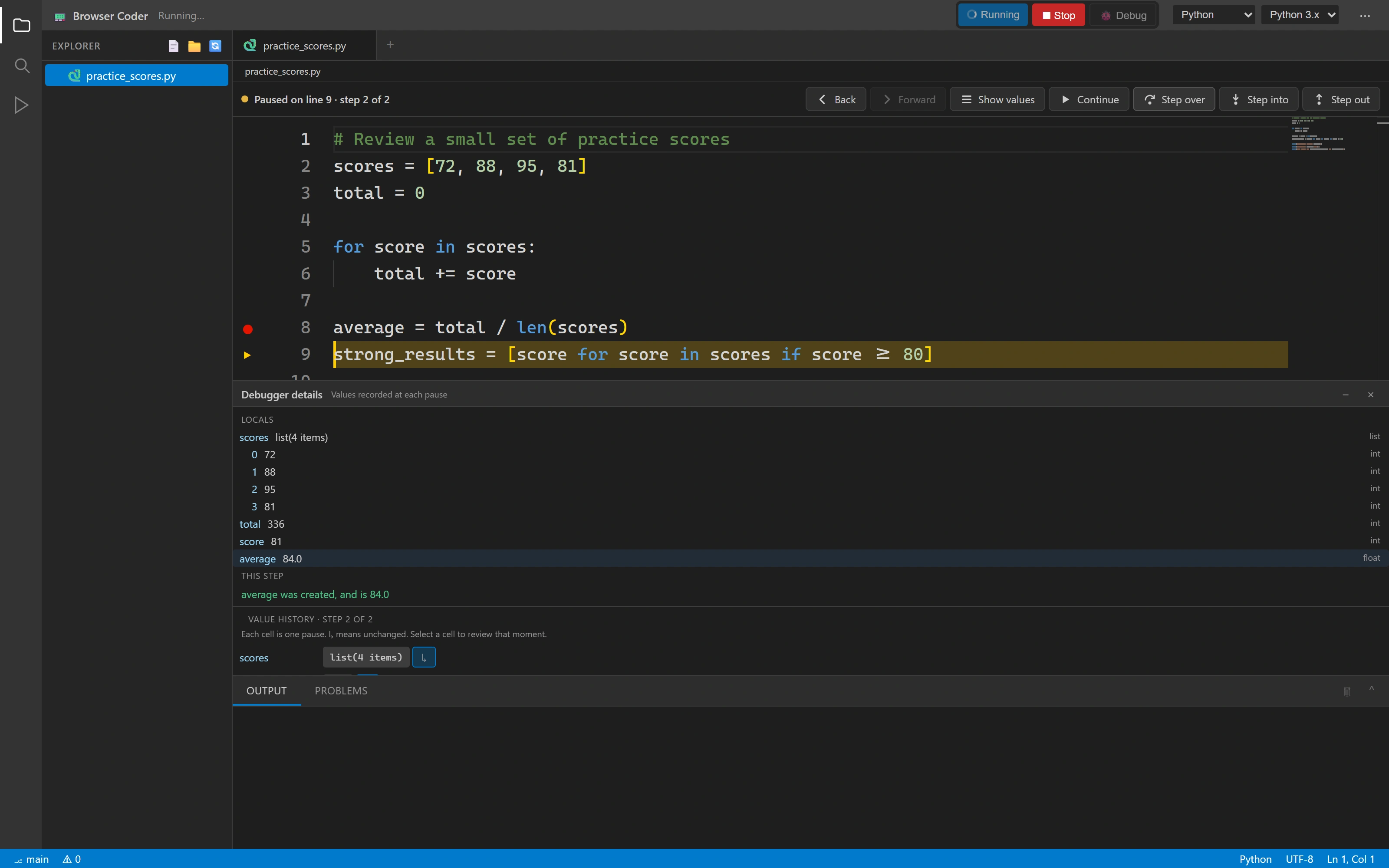
Connect a line to a value
Stepping creates a new pause snapshot, so learners can connect an expression to its result.
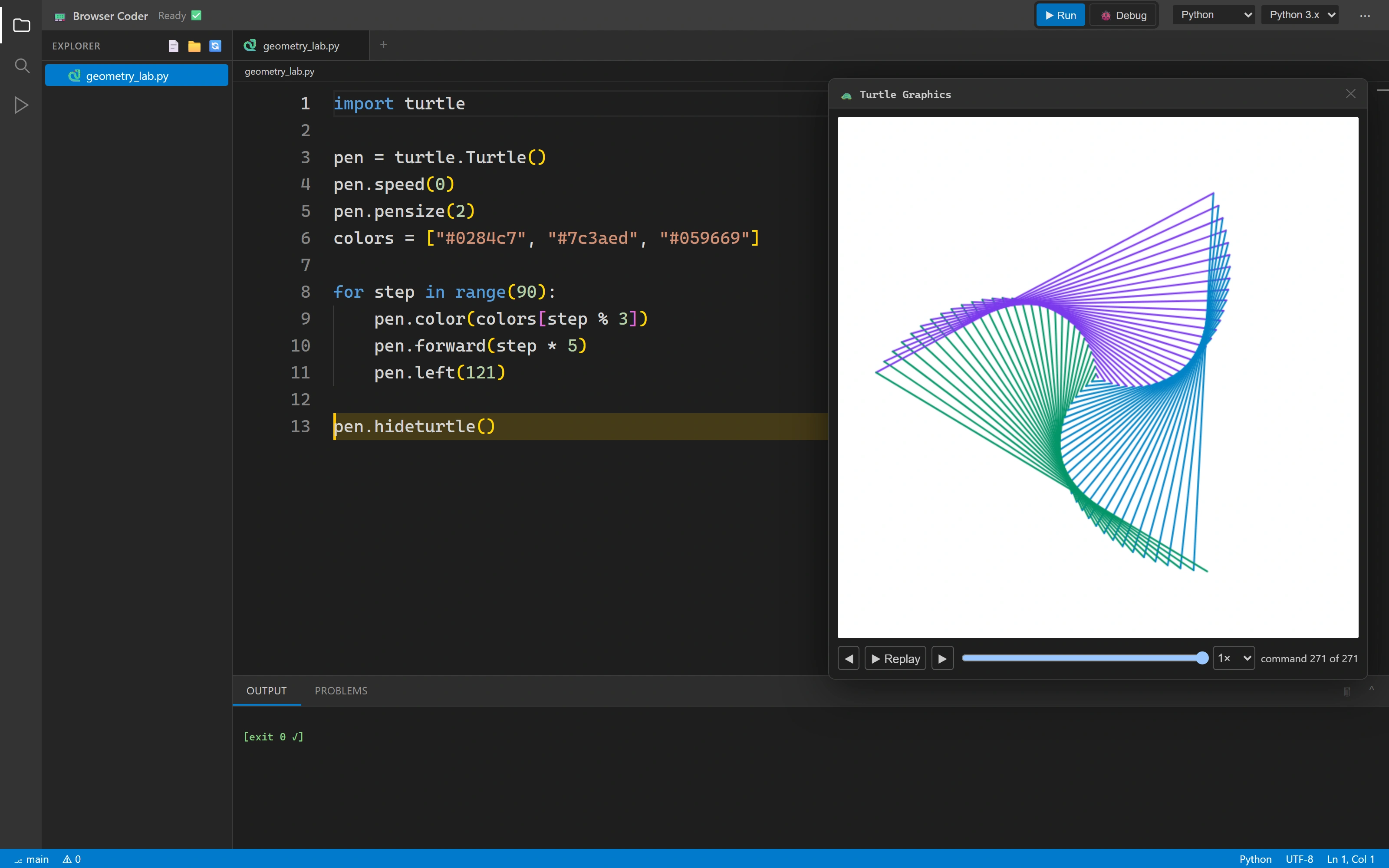
A loop you can see
The finished drawing is generated by Python, then rendered by Browser Coder’s own Turtle canvas.
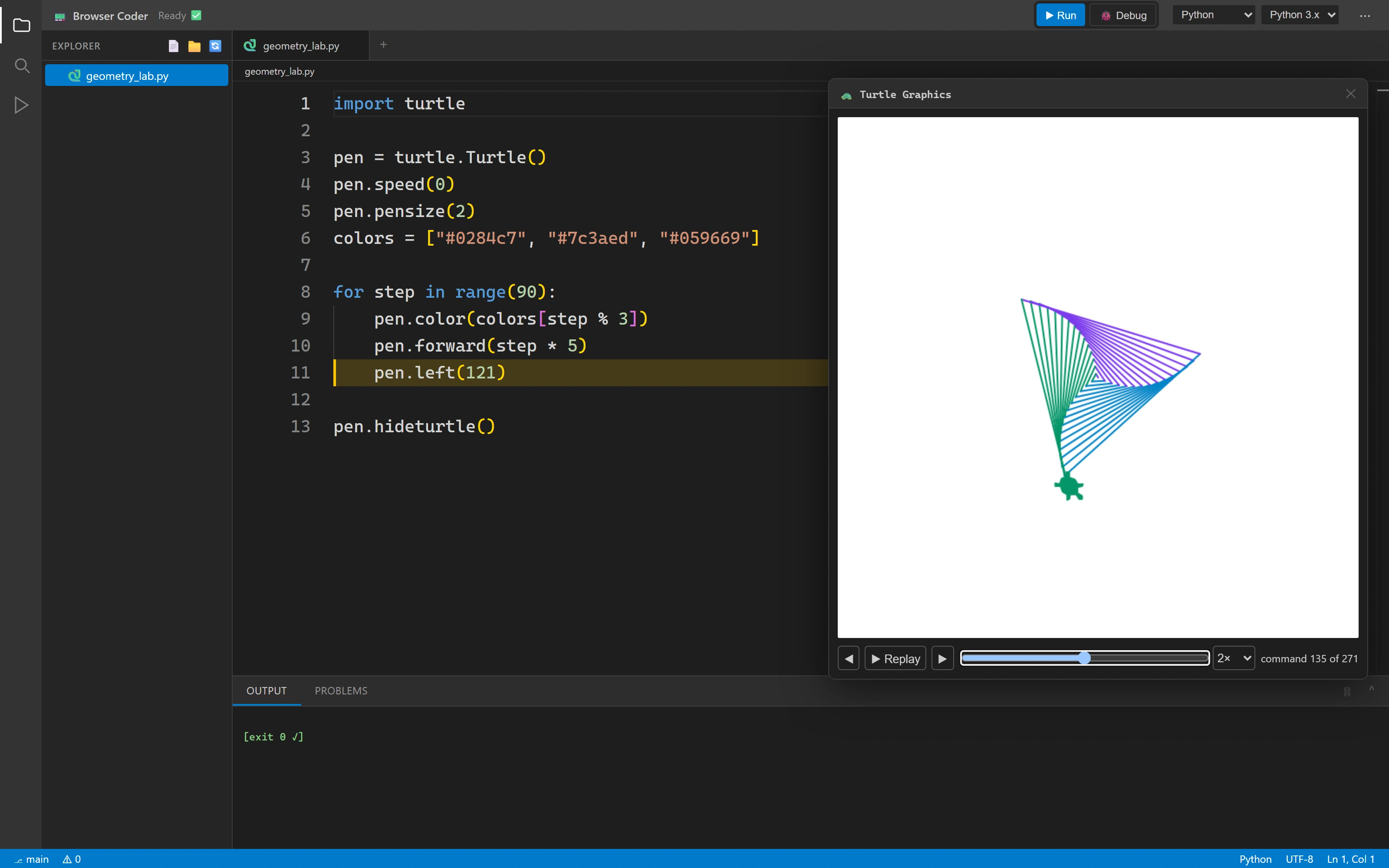
Follow the drawing back to its source
Replay controls expose the recorded command sequence and highlight the line that produced the selected step.
FOR THE TECHNICALLY CURIOUS
The thinking underneath.
The important boundaries, implementation choices and trade-offs. Open a topic for the details.
- 01
A local workspace
Monaco edits documents; IndexedDB stores the learner’s files and revision-aware saves.
- 02
One command boundary
Run, edit and workspace actions share capability checks, whether invoked by a button, key or host.
- 03
Managed execution
The server selects a language adapter and manages a per-run job directory, process and run lifecycle.
- 04
State made visible
Output, diagnostics, debugger snapshots and Turtle commands return to their own presentation layers.
TypeScript · Monaco · IndexedDB
Editing, local files, diagnostics and debugger presentation run in the browser.
Node.js · Express · Language adapters
A shared pipeline validates requests, manages language processes and streams execution state.
Host messaging · Canvas · Replay
Arc can embed a bounded coding activity. Recorded Turtle commands connect visual output to source.
01Share a lifecycle across six different toolchains.
A shared pipeline validates the project, admits the run, prepares its temporary workspace and selects the language adapter. Compilation, streamed output, cancellation and cleanup have explicit boundaries. C# supplies a service-owned project and offline NuGet configuration; Python bootstraps its guard separately so the learner’s line numbers remain intact.
Each run has a separate directory, but jobs share the service’s OS user. Production containment is configured around the API replica, not a container per learner. Interactive runs disable the ordinary wall timeout and rely on stream closure, Stop and output limits; no hostile-code isolation or load benchmark is claimed.
02Let a learning platform set the workspace boundaries.
Host messages wait for initialization and are processed in sequence. Replacing a project reconciles files by path and commits files, folders and state together. Editing, file structure, running and panel visibility can be controlled independently through the embedding protocol.
Origin validation is an integration convention; incoming messages do not verify the sender window against the parent, and outgoing messages can use a wildcard fallback. Embedded instances use fresh local databases. The host owns lasting lesson context; this is not account-based cloud sync.
03Save the revision that was actually written.
Each document has a debounced, serialized write queue. A save captures content and its revision together; when it completes, only that captured revision is marked saved. Typing during the write remains dirty instead of being mistaken for persisted work.
Flush has a bounded retry loop and can report that newer edits superseded the save. Storage failures remain visible instead of retrying forever or replacing the live editor buffer.
04Make feedback specific enough to act on.
Compiler diagnostics take priority over advisory scanner messages on the same line. Error first aid offers only narrowly recognized repairs, such as a missing Python header colon. The test runner accepts a teacher-defined harness and parses pass, fail and skip results into learner feedback.
The system refuses ambiguous harness selection and uncertain repairs. Hidden harness files are a learner-interface convention, not a secrecy or anti-cheating boundary.
05Keep recorded history separate from live execution.
The debugger retains up to 500 stop snapshots. A history cursor changes the displayed state while the live pause stays intact. Variable comparison is scoped to the displayed file and function, and a new stop returns the view to the live session.
This is inspection history, not reverse debugging. Recursion can share a comparison frame; the interface does not promise a complete historical heap or replay of every program effect.
06Share a snapshot without promising live collaboration.
Sharing publishes the current project files and entry point. Opening the link initializes a separate editable workspace. Web preview likewise publishes a multi-file snapshot so relative styles and assets can travel together.
There are no shared cursors or simultaneous editing. Preview content receives a sandbox policy on the served asset response as well as its wrapper; preview pages can still make permitted network requests.
SCOPEWhat this evidence establishes
- The films demonstrate real local Python execution, debugging, teacher-defined checks and Turtle replay. The source contains six execution adapters; this is not a claim that all six were exercised in these recordings.
- The web preview and shared workspace use a fictional HTML/CSS student project. Its design is sample input, not a built-in Browser Coder template.
- Pause history and Turtle replay are distinct features. Source-linked ordinary text output uses print-site heuristics rather than a complete runtime trace.
- The local preview route was forwarded to the original API to match the production route arrangement. No application result was mocked. A rename-input issue found during capture is documented in the review and is not shown as a successful workflow.