Arc
Live. Growing. Built together.
One platform.
Three ways inside.
A learning platform connects more than lessons. Arc brings the people who plan, teach and learn into one shared experience.
Choose a portal. Open a page. Follow your curiosity.
Management / Content / BI
See the bigger picture.
The people, the curriculum and the intelligence behind the whole program.
Classroom / Feedback / Live tools
Bring the classroom to life.
Prepare a lesson, follow every learner and make feedback part of what happens next.
Themes / Activities / Learning
Make learning your own.
A world to explore, ideas to create and more than one way to show what you know.
Free to explore. Nothing to break. The interactive portfolio demo uses fictional data and read-only views of Arc’s capabilities. Original app screenshots and recordings are available throughout.
Watch the original app ↗THE WORK BEHIND THE WORLD
Built for people.
Built with care.
Where I contributed
I build, support, and continually expand Arc with one coworker. My work spans typed application boundaries, permissions, realtime workflows, touch-friendly editors, and automated delivery checks. My coworker and I continue to support and expand both Arc and Browser Coder.
My coworker and me, building and supporting the platform.
Across Arc and Browser Coder combined.
Shared content, classroom context, original work and feedback.
KNOW WHAT YOU ARE LOOKING FOR?
Go straight there.
From BI to branching stories. Every view has its own address, and each portal has search.
Administration33 explorable views
Instructor24 explorable views
Student31 explorable views
THE ORIGINAL SOFTWARE, IN MOTION
See the moments connect.
The program behind the classroom.
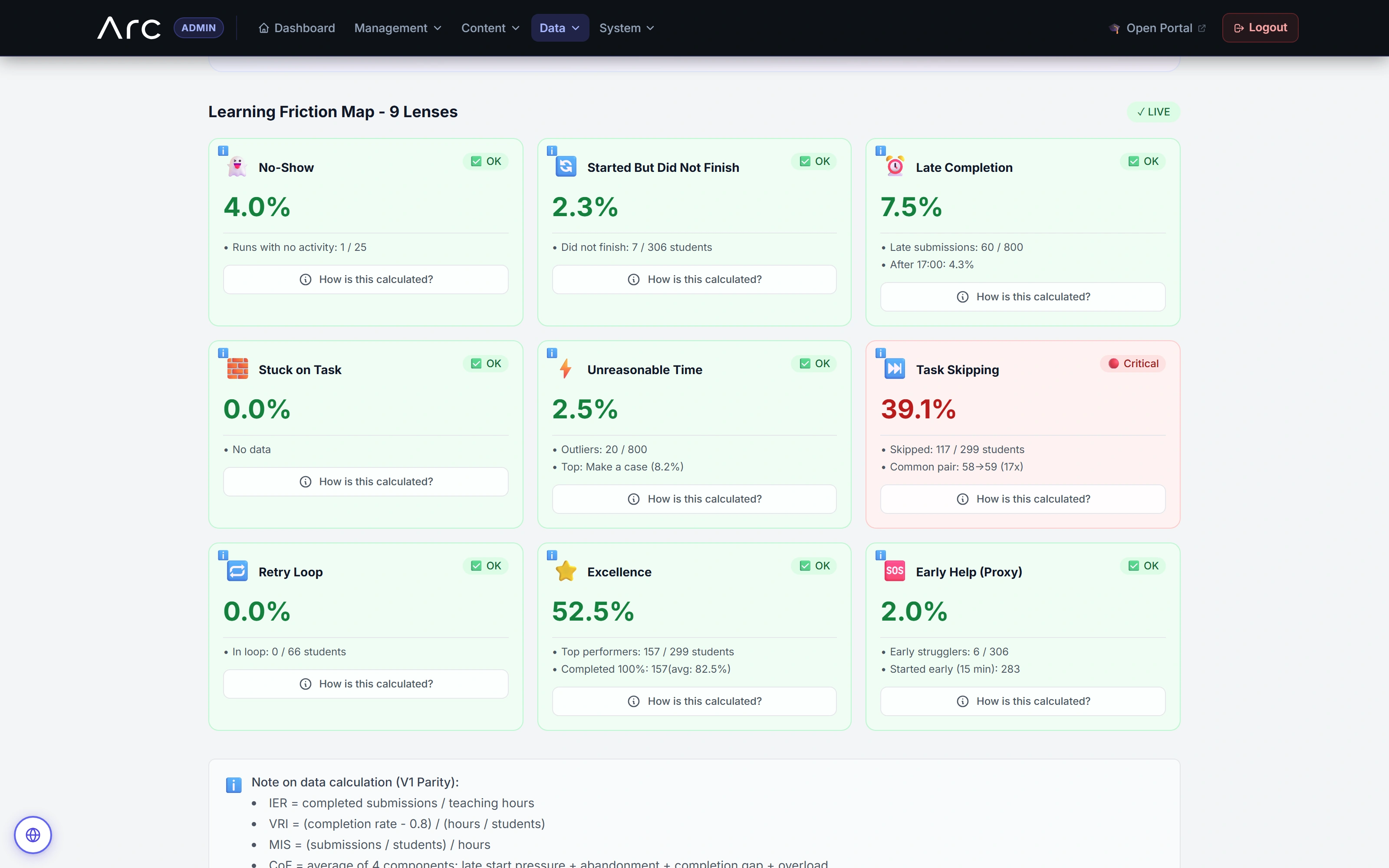
Explore the original admin and scoped school analytics: inventory, nine friction lenses, an open calculation, modeled indices, a comparison gate and the work behind the numbers.
Read the walkthrough
- Inventory and activity
The original BI view separates all-time inventory from activity within the selected period. Every figure comes from fictional local fixtures.
- Nine friction lenses
Nine distinct lenses show different participation and workflow patterns. Labels and calculation controls remain visible in the original interface.
- Open the calculation
The native No-Show explanation opens. A close-up retains its formula, variables and concrete substitution: one qualifying run out of 25 gives 4%.
- Read modeled indices carefully
The 30-day modeled-index view includes five eligible peers. Its VRI calculation includes a fixed 0.8 assumption; these indices are not validated causal measurements of teaching quality.
- Respect the comparison gate
A separately loaded seven-day slice has no eligible peers. Arc retains absolute values and explicitly withholds a fair peer comparison; this differs from the 30-day view shown before it.
- Review queues and grade context
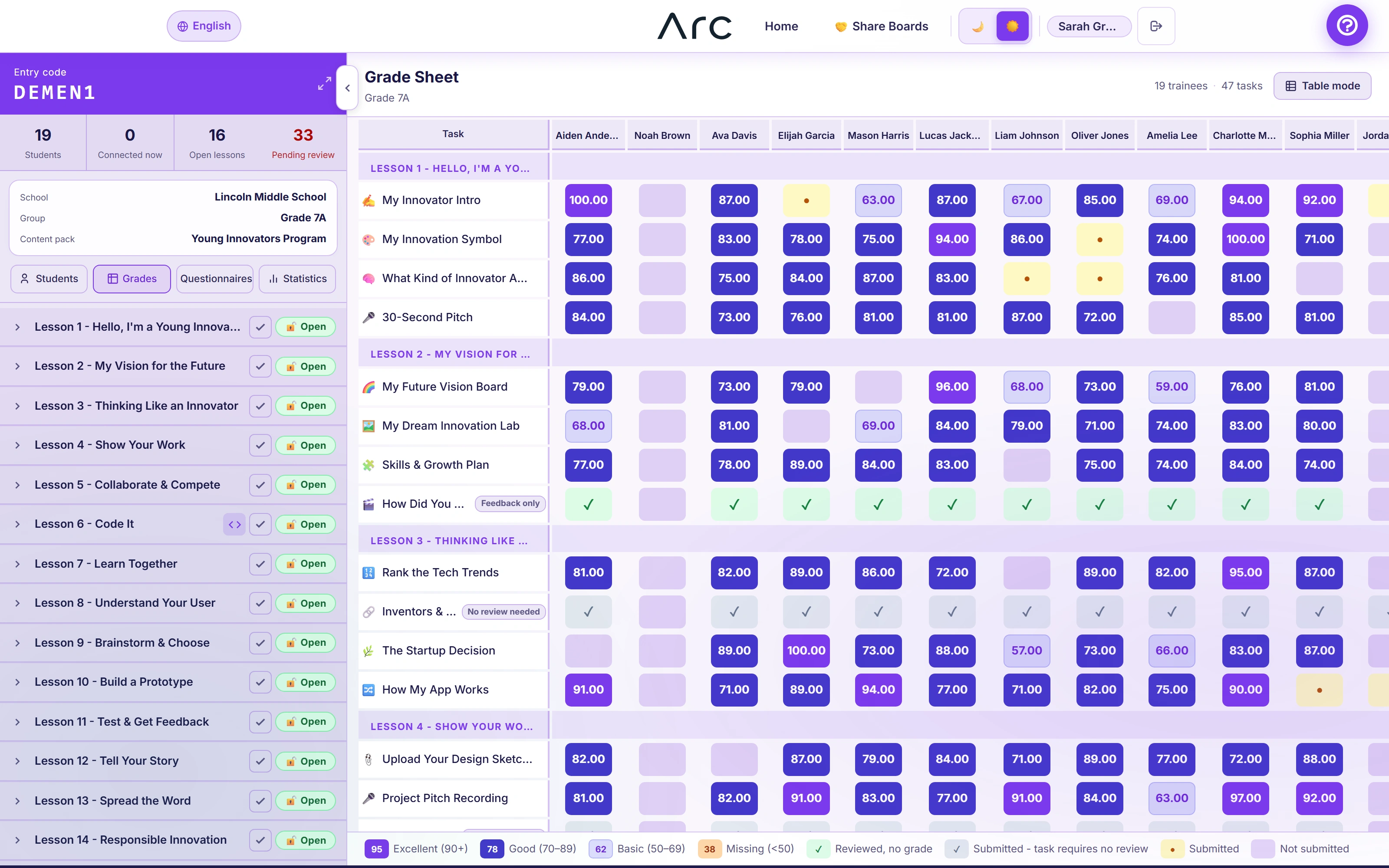
The scoped school analytics view displays review age, score distribution and a class-by-lesson grade matrix. A detail insert makes the matrix values readable.
- Follow lesson progression
Started, submitted and reviewed counts stay separate along the lesson sequence, followed by a weekly trend view. This is fictional history, not reported live program impact.
A world to learn in.
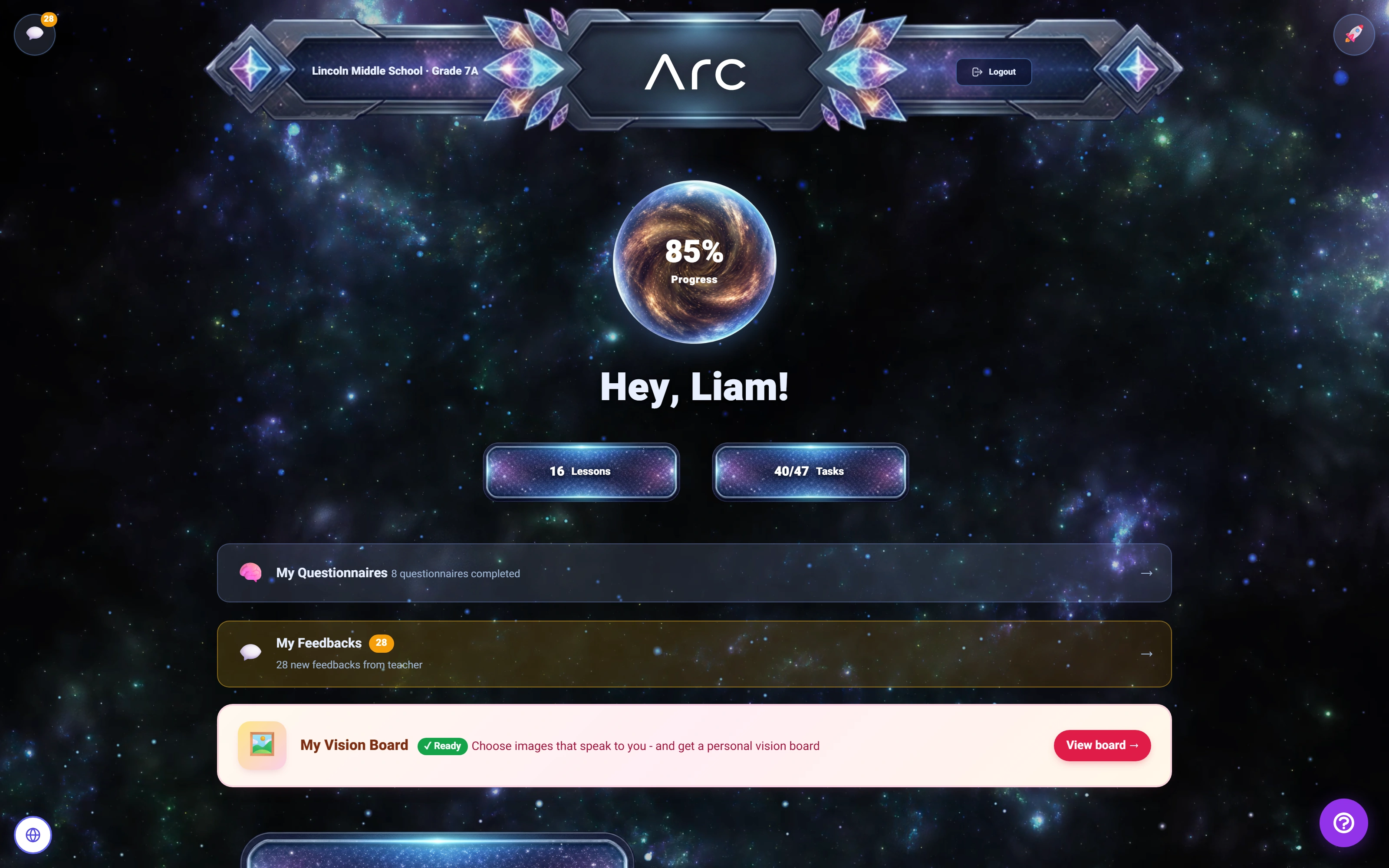
Three student themes lead into a matching activity, from visible connections to a submitted result.
Read the walkthrough
- Choose a learning world
Space, Magic Forest and Neon Hacker are real, persisted student preferences.
- Solve a visual activity
The student completes the remaining three pairs using the native matching controls.
- Submit the result
Arc accepts the matching submission and displays its submitted state. The stored score was checked separately.
- Review a saved version
The native locked-version view displays the six stored pairs.
FOR THE TECHNICALLY CURIOUS
A shared system underneath.
Different experiences meet at the same learning records, permissions and lifecycle.
01Change the world around the work, not the work itself.
The theme registry defines Aurora, Aurora Light, Neon Hacker, Magic Forest and Space. A validated student preference selects the experience; theme resolution has a safe fallback. The learning records do not need to be duplicated for each visual style.
The trade-off. Themes change navigation, progress treatment and atmosphere. They are presentation choices, not separate games or evidence of improved learning outcomes.
02Give different activities different submission contracts.
The task registry dispatches to specialized handlers. Canvas and flowchart work export visual artifacts; matching stores structured answers; programming has a Browser Coder boundary; shared sessions finalize participation into submissions. Reflection, sorting, questionnaires and external launches have their own paths.
The trade-off. The canonical enum lists 21 kinds, including games and instructor-led or external activities. That is not a claim of 21 equally complete standalone editors. The films exercise a selected set of native activities.
03Keep late autosave from rewriting a submitted moment.
Submission services distinguish draft updates from submitted work. A late autosave does not silently invent a new draft after submission. Published reviews belong to the submitted version, so later student changes do not erase the context the instructor reviewed.
The trade-off. Each editor must respect that lifecycle. Text revision is demonstrated; the captured flowchart’s new-version editor did not automatically copy the previous editable diagram, so that behavior is not promised here.
04Treat a live lesson as shared state with clear transitions.
Quiz services validate the current question, membership, active state and timing before accepting an answer. Instructor controls close, advance and end rounds. Other shared modes have distinct rules: moderated word clouds, anonymous-position heatmaps, turn-based debate and branching votes.
The trade-off. Realtime presentation needs a recovery path. The demonstration uses Arc’s polling fallback with independent browser sessions; it does not establish WebSocket latency or production performance under load.
05Separate curriculum assembly, publication and release.
The smart draft generator scores existing activities using tags and preferences. An author can edit the result and inspect coverage. Publishing creates a reusable pack; assigning a pack to a class and releasing its lessons are separate operations.
The trade-off. Preferences influence ranking rather than guaranteeing exclusive task types or hard tag constraints. The captured draft deliberately contains preparation gaps; generation is not proof that a curriculum is ready to teach.
06Include access scope in the report’s identity.
Analytics intersects actor restrictions with the requested reporting scope, then includes that context in cache identity. School views can connect aggregate activity to permitted classrooms and submission previews.
The trade-off. Participation and learning-friction indicators describe recorded activity. They are not validated educational outcomes, and questionnaire profile labels are not a clinical assessment.
07Keep exploration separate from production.
This portfolio demo presents selected read-only states for each catalogued capability. Its charts, filters and examples use a local fictional dataset. It does not connect to learner accounts, run code, submit work or call Arc’s services.
Original screenshots and recordings were captured from an isolated copy of Arc with synthetic accounts. They document real application behavior at their recorded revisions. Source review, the portfolio demo and production operation are distinct evidence.